Running Meta Ads is an ART and psychology. Here you have a complete Meta Ads guide that will skyrocket your results.
Step-by-Step Meta Ads Process
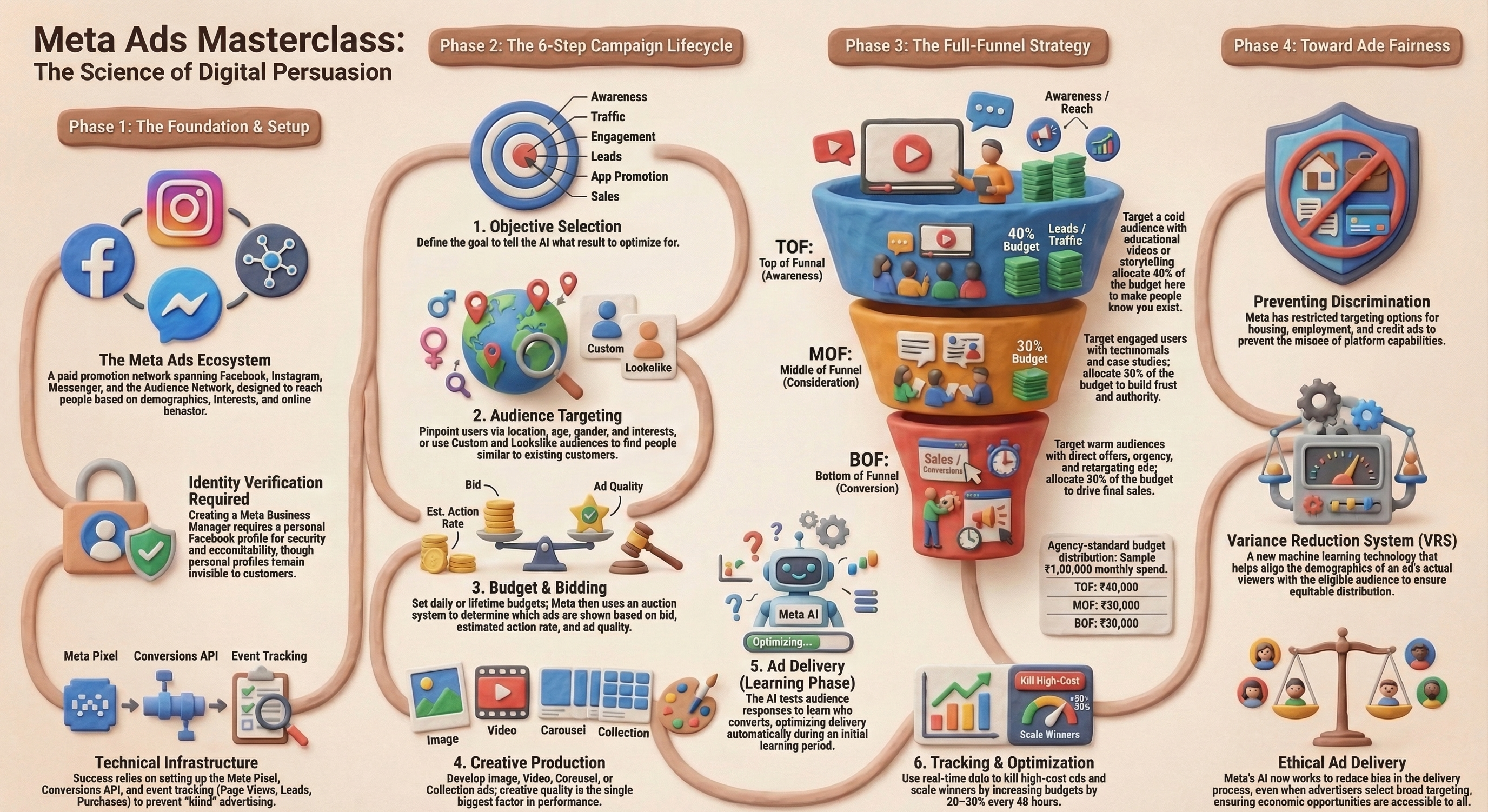
1. Set Up Foundational Assets
Create Business Manager using your FB account: Go to business.facebook.com/overview and create an account to manage your assets centrally.
Connect Assets: Link your Facebook Page, Instagram Profile, and WhatsApp account in Business Settings.
Create Ad Account: Set up a new ad account to manage billing and campaigns.
2. Install Meta Pixel or Conversions API on Website
Create Pixel: In Events Manager, create a Meta Pixel to track website actions.
Install Code: Place the pixel code on your website (or use partner integrations like Shopify) to track visitors.
Set Up Events: Use the Event Setup Tool to track specific actions, such as “Purchase” or “Lead”.
3. Campaign Level Settings (Why You Are Running This Campaign)
Navigate to Ads Manager: Go to Meta Ads Manager and click “+ Create”.
Choose Objective: Select the goal based on your objective: Awareness, Traffic, Engagement, Leads, App Promotion, or Sales.
Name & Category: Name your campaign and select a special ad category if applicable (e.g., housing, employment).
4. Ad Sets Level Settings (Targeting, Scheduling, Platforms and Budget)
Define Audience: Select location, age, gender, and detailed targeting (interests/behaviors).
Budget & Schedule: Set a daily or lifetime budget and scheduling dates.
Placements: Use Advantage+ placements (recommended) to let Meta optimize where ads appear, or select manual placements.
5. Ad Level Settings (Creative, Captions, CTA)
Format: Select ad format: Image, Video, or Carousel.
Upload Creative: Add media, ad copy, headline, and call-to-action button.
Link Destination: Set the URL where visitors should land.
6. Go Live, Monitor & Optimise
Review & Publish: Review all settings and click “Publish”.
Monitor Performance: Check metrics that suits to your campaign objectives like Cost per Acquisition (CPA) and Click-Through Rate (CTR) in Ads Manager to determine if you should scale or stop the ad.